


5/29/26 Website Demo Meeting Notes: New Features, Updates & Reminders
Here are the key updates, enhancements, and reminders from the May 29 demo session. This demo focused on migration deadlines, common CMS questions, a new self-updating catalog link solution, recently released components and snippets, and upcoming Modern Campus enhancements.
Updated Internal Deadlines
The Department of Justice has extended the deadline for the new ADA Title II digital accessibility requirements by one year, to April 26, 2027. While this provides additional time, it does not change the importance of the work already underway—or the need to continue making steady progress.
To maintain momentum and provide clarity, we have established the following internal milestones:
- By June 30, 2026: All sites intending to remain live on stonybrook.edu in 2027 must request a new site shell.
- By August 15, 2026: All sites must be cut over and live in the new environment.
- By January 15, 2027: All sites remaining in the old environment will be taken offline.
- By February 15, 2027: All links must be updated to eliminate 404 errors and reduce reliance on unnecessary 301/302 redirects.
- By April 15, 2027: The majority of redirects will be retired. Select high-traffic, mission-critical redirects may be evaluated and retained as needed.
The Web Services team continues to encourage units to maintain momentum rather than
treating the extension as additional time to delay migration efforts. Sites are being
cut over daily, and support remains available throughout the process.
Freelance Support Remains Available
Departments needing additional migration assistance can hire from our vetted freelancer directory. These freelancers have been trained on the new templates and migration process and
can help accelerate rebuild efforts.
Office Hours and Google Space Updates
Office hours have officially moved to a biweekly schedule and are now held every other Wednesday from 3:00–4:00 p.m. These sessions are intended for troubleshooting, CMS questions, and collaborative problem-solving with fellow editors.
Editors were also encouraged to join the Modern Campus Google Announcement Space. This broadcast-only channel will be used for:
- System outage notifications
- New feature announcements
- New help guides
- Office hour reminders
- Demo session updates
The Google Space will serve as the fastest source for real-time CMS communications, so please join it if you did not yet.
Common Issues
Breadcrumb Management
Editors can manage breadcrumbs in two ways:
- Rename or skip folder-level breadcrumb labels using the folder breadcrumb settings.
- Disable breadcrumbs entirely through Page Properties when they are not needed, such
as on homepage-style layouts or pages with extensive alternate navigation.
Use Hero Components, Not Standalone Images
A recurring issue involves editors placing images directly into the Hero Area rather than using the Hero component.
Using the Hero component ensures:
- Responsive image sizing
- Proper mobile behavior
- Automatic H1 heading support
- Access to text overlays, buttons, and layout variations
Directly inserting an image bypasses these benefits and can create accessibility and
layout issues.
Shared Image Library Reminder
The shared image library contains many pre-sized campus images, including hero banners, backgrounds, and other component-ready assets.
Editors should continue uploading their own images into their site's image folders
and avoid uploading their own image files into the shared library.
Hero Image Cropping Guidance
A new hero image guide and templates will be added to the Web Support site to help
editors properly crop hero images. Although hero images are uploaded at 2600×1400
pixels, only a portion of the image is visible on screen, making proper composition
especially important when people appear in the photo.
Large Hero Banners
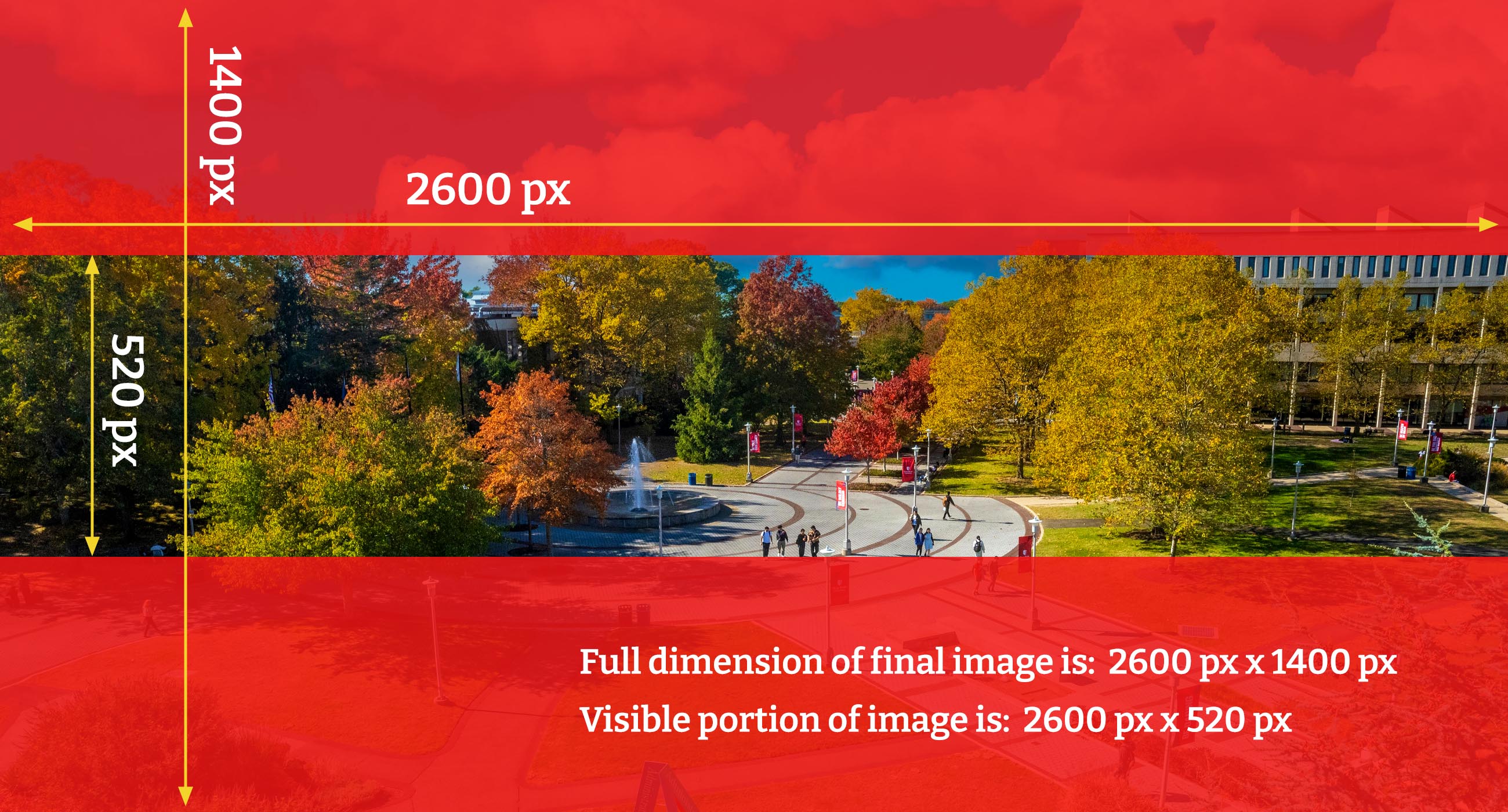
Small Hero Banners
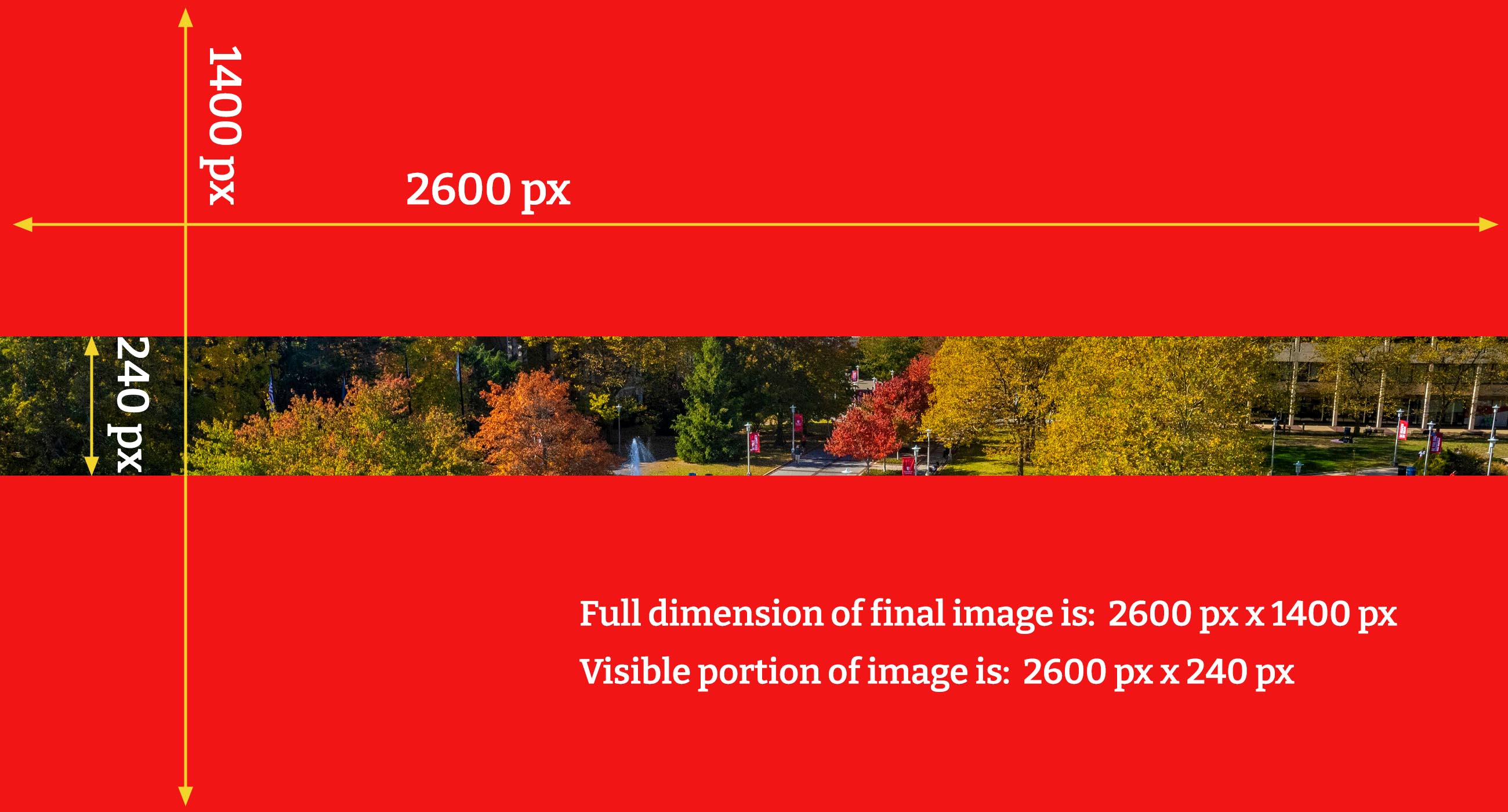
New Feature: Self-Updating Catalog Links
Special guest Nick Raia from Enrollment Management introduced a new self-updating catalog link system designed to solve a longstanding catalog maintenance problem.
The Problem
Traditional catalog links point to specific catalog versions. When a new catalog is
published, those links continue directing visitors to outdated requirements, policies,
and program information. This created significant maintenance work for units with
many catalog references.
The Solution
Nick developed a self-updating link system that automatically detects the active undergraduate, graduate, and health sciences catalogs each night and routes visitors to the latest published content. The system supports:
- Catalog homepages
- Academic programs
- Courses
- Policy pages
No special code or configuration is required. Editors simply copy a generated catalog
link and use it like any other hyperlink within Modern Campus CMS.
The system has already been successfully tested through a catalog publication cycle
and automatically updated hundreds of links without manual intervention. Documentation
for this feature will be added to the Web Support site.
New Components and Snippets
Several new tools are now available to editors.
People Profile Cards
For units that do not want to use the spreadsheet-driven People Directory utility, a new People Profile Card component allows editors to manually create staff and faculty cards directly on a page.
Features include:
- Optional photos
- Multiple image styles
- Configurable background colors
- Profile links and contact information
The spreadsheet-driven People Directory remains the preferred option for larger directories.
Image Galleries
New gallery options replace the inaccessible image gallery assets used in the previous CMS.
Editors can now choose:
- Image Carousel
- Image Gallery with Lightbox Carousel
These provide accessible ways to display photo collections and event galleries.
Simple Responsive Columns
The new simple responsive columns snippet allows editors to create flexible multi-column layouts that remain mobile-friendly.
Benefits include:
- Responsive stacking on mobile devices
- No tables required
- Ability to create more than the standard two- or three-column layouts
This provides a more accessible alternative to using tables for layout purposes.
Zig Zag Snippet Hack
Editors can use the existing Zig Zag snippet as a full-width, single-row content block by removing additional rows. This creates
an attractive image-and-content section with background styling and is particularly
effective on full-width layouts.
Accordion Search Filter
A new filter component can now be placed above accordion groups, allowing visitors to search within large
FAQ collections or other accordion-based content. Matching results remain visible
while unrelated sections are filtered out.
Table Search Filter
Similarly, a new table filter component allows visitors to quickly search large data tables without scrolling through extensive
content.
Responsive Table Enhancements
Editors now have additional responsive table styling options available through both:
These options improve mobile usability and reduce horizontal scrolling while offering
additional visual styling choices.
Dynamic News Feed Component
A new SBU News Feed component allows departments to display stories directly from news.stonybrook.edu based on
selected categories. Editors can now add these feeds themselves without assistance
from Web Services.
Dynamic Events Feed
Departments using the Brightly Events Calendar can now display dynamic event feeds on their websites using either horizontal or vertical layouts. The feed can be configured
to display specific event categories or calendars.
Web Support Site Continues to Grow
The Web Support site received several updates and remains the primary source for documentation, tutorials, forms, migration resources, accessibility guidance, and component examples. Editors were encouraged to check the site before submitting support requests, as many common questions are already addressed there.
Submitting support forms remains the fastest way to receive assistance because requests are routed to the
entire Web Services team rather than a single individual.
Coming Soon: Improved Alt Text Management
Modern Campus's July release will introduce starter alt text support. Editors will be able to store alt text directly with images, allowing it to automatically populate whenever the image is inserted elsewhere in the CMS.
The stored alt text can still be modified on individual pages when contextual differences require it. Existing image placements will not automatically update if the stored alt text changes later.
AI-assisted alt text generation within Modern Campus may become available in the future.
Editors are reminded that AI-generated alt text should always be reviewed for accuracy,
clarity, and relevance to the page context before publishing. Learn more about how to write effective alt text here.
Accessing Old Sites
A fix is available for errors when logging into the legacy CMS environment. Editors who still need to make changes to old sites can access them through this general login link. Publishing affected pages will restore normal editing behavior moving forward.