


Department Section Sidenav
The Department Section Sidenav provides a left-hand navigation that appears across
all pages within a section of a department website.
The sidenav is automatically generated based on folder structure and navigation settings.
When configured correctly, it builds one combined navigation for the entire section.
How the Section Sidenav Works
Each folder contains a navigation file called nav.ounav. These files control what appears in the left navigation.
The system builds a section-wide sidenav starting at the folder marked as the Section Root.
Two settings control this behavior:
- Make this a section root (Yes/No)
- Section Title
These settings are selected when creating a new section using the wizard.
Creating a New Section
When creating a new section, use the Department Section (with sidebar) wizard.
You will see the following sidenav-related options:
- Add Navigation Item (Yes/No)
Select Yes to add the page to navigation.
Changes will not appear on the live site until published. - Make this a section root (Yes/No)
Yes means this folder starts the sidenav for the entire section.
No means this folder is part of an existing section. - Section Title
This becomes the heading displayed above the sidenav.
Use a clear, user-friendly title.
Only the top folder of a section should have Make this a section root set to Yes.
All subfolders within that section should be set to No.
Setting multiple folders to Yes within the same section can cause unexpected navigation
behavior.
Editing an existing sidenav
To update your section navigation:
-
Open the nav.ounav file in your folder.
-
Existing pages in your section will already be listed.
-
Click an item to edit its title or link.
-
Drag items to reorder them in the navigation.
To add a page:
-
Click Add Page
-
Enter the page information
-
Save and publish
External Links
If you link to another website, select Open in new tab.
Tip
Try to keep sidenav links focused on pages within your site. External links are usually
better placed in page content rather than the left navigation.
Dropdowns (Folders Inside Folders)
A subfolder shows up as a dropdown in the sidenav when it has its own _nav.ounav file. The parent folder's _nav.ounav supplies the dropdown's name; the subfolder's _nav.ounav supplies the links inside it.
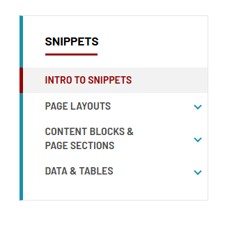
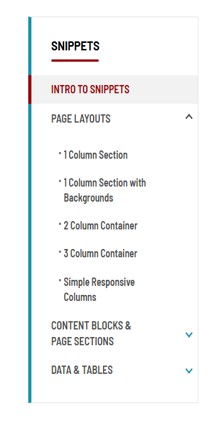
Tip: CMS Preview only shows part of the sidenav. Always check the published page to see your dropdowns.
Turn a Dropdown Off
You don't delete anything, and your pages stay live.
- Open the subfolder that's showing as a dropdown.
- Hover over _nav.ounav, choose File > Rename, and rename it to _nav-off.ounav. (Or remove it with the Unpublish gadget.)
- If that subfolder has its own subfolders with a _nav.ounav, rename those too.
- Check the published page. The section now shows as a plain link with no arrow.

- Want the section gone from the sidenav completely? Also delete its link from the parent folder's _nav.ounav and publish.
- Just removing one page from a dropdown? Skip the rename. Delete that one link from the subfolder's _nav.ounav and publish.
- Dropdown came back? Adding a page with Add Navigation Item = Yes can recreate _nav.ounav. Choose No for new pages in that folder.
Add a Dropdown
- Open the folder where the dropdown should appear and choose New > Department Section (with sidebar).
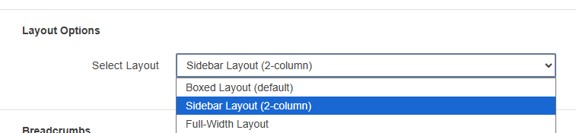
- Set Make this a section root to No, Add Navigation Item to Yes, and Select Layout to Sidebar Layout (2-column) (the default is Boxed).
- Add pages inside the new folder with Add Navigation Item = Yes.
- Publish the new pages, the new folder's _nav.ounav and _props.pcf, and the parent's _nav.ounav.
Before You Submit a Ticket
- Did you check the published page, not Preview?
- Is the page set to Sidebar Layout (2-column) in Properties?
- Did you publish every file you changed?
- Did you edit the right _nav.ounav? (Parent folder for the main link, subfolder for the dropdown links.)
Still stuck? Submit a ticket with the page URL and the folder you were working in.