



3/27/26 Workshop Notes: New Features & Workflow Updates
Here are the key updates, enhancements, and reminders from the March 27 demo session. It focuses on practical changes that affect how you build pages, manage content, and prepare your site for launch.
These updates are based on real usage patterns as more sites move into the new templates, and are intended to reduce friction, improve consistency, and support accessibility and SEO.
Creating Pages: Layout Selection at the Start
When creating a new interior page, you can now select your layout at the time of creation instead of setting it afterward in Page Properties.
Available options include Boxed (default), Sidebar and Full-width. This removes extra steps and helps you start with the correct structure immediately. You can still change the layout later in Page Properties if needed.
Learn more about page layout options
Page Building Best Practice: Use the Main Content Area
A key recommendation reinforced in this session is to keep content within the Main Content area whenever possible.
Additional content sections still exist, but:
- They are harder to rearrange
- They may require code edits to move
- They add unnecessary complexity
Components placed in the main content area can be dragged and reordered easily, making page management much simpler over time.
Image Management: Use the Right Folders
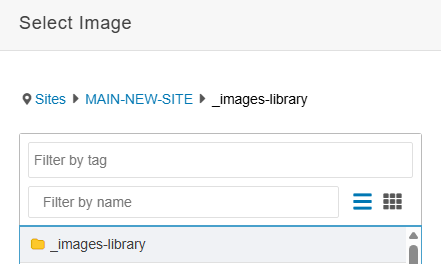 The shared image library now includes pre-sized, approved images for components such
as banners and backgrounds.
The shared image library now includes pre-sized, approved images for components such
as banners and backgrounds.
However, please do not upload your own images into the shared image library. Upload all custom images into your site’s own image folder.
Keeping images organized in your site folder prevents clutter and makes long-term maintenance much easier.
Metadata: Titles and Descriptions Are Manual
Title tags and meta descriptions are no longer automatically appended. This means you must manually write a full title and meta description for each page, and you should append your unit name and “Stony Brook University” to the title.
This is critical for both SEO and usability. Pages without proper metadata will underperform in search and appear incomplete in results.
AI can help make this process easier. Below is a prompt you can use. Replace the [placeholders in brackets] with your own information.
AI Prompt
Create a title and meta description for the below page using this template:
Title
Guide: Adding the 3 Boxes with Parallax Background Component | [YOUR SITE NAME] | Stony Brook University
Meta Description
Learn how to add and customize the 3 Boxes with Parallax Background component to highlight three key pathways or calls to action.
The Page Content
[PASTE YOUR PAGE'S CONTENT HERE]
New Layout Options: Background Sections
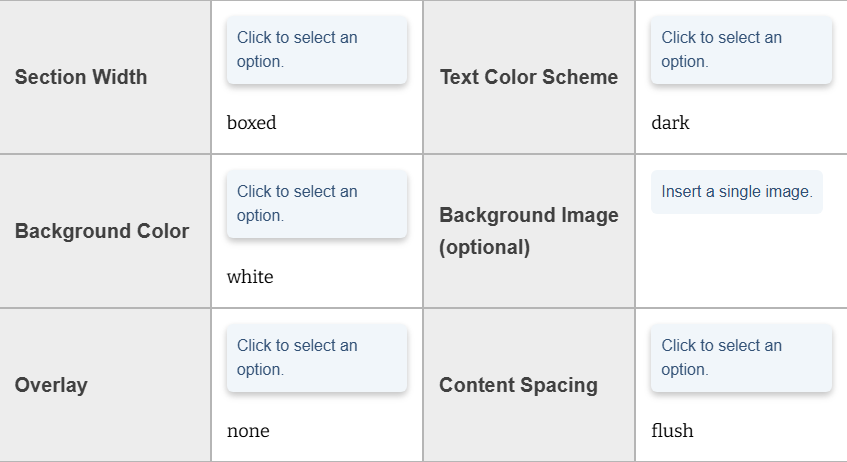 The one-column layout snippet has been enhanced with background options and is now
available.
The one-column layout snippet has been enhanced with background options and is now
available.
Features include:
- Background color options (light and dark themes)
- Optional background images
- Overlay controls to ensure text readability
- Content spacing options (flush vs. inset)
When using background images, ensure sufficient contrast so text remains readable. Some images will not work well and should be avoided.
Additional multi-column versions of this layout are planned.
Flip Cards: More Flexible Layout
The flip card component no longer requires groups of four.
You can now add cards one at a time, display uneven totals (e.g., 5 or 6 cards), and allow cards to wrap naturally. This gives more flexibility without forcing rigid layouts.
Note: Flip cards do not perform well in sidebar layouts due to limited width.
People Profiles: New Page Template
A new People Profile page type is available and includes a built-in profile component.
This allows you to:
- Create individual profile pages quickly
- Store all profiles in a single folder
- Add additional content below the profile (tabs, accordions, etc.)
Profiles must still be manually connected to directory listings if you are using the People utility.
People Utility Enhancements
Several improvements were made based on user feedback:
- Custom labels and values (up to two per person)
- Cleaner email display (no more long wrapping addresses)
- Improved visual clarity (removal of misleading link styling)
These updates make directory pages more flexible and easier to manage without breaking structure.
You can transfer your existing spreadsheet data into a copy of the updated template or add the custom_1_label, custom_1_value, custom_2_label, custom_2_value columns to your existing spreadsheet(s).
Learn more about the people utility
Cutover Process: Required Steps
Before launching your new site, two critical requirements were emphasized:
Redirect Spreadsheet
You must provide a complete mapping of old URLs to new URLs. This ensures users don’t hit 404 errors, external links continue to work, and bookmarked pages still resolve correctly
If a page no longer exists, redirect it to the closest relevant page, not a dead end.
See our redirect guide and download the spreadsheet
Cutover Request Form
Do not use general support tickets to request a launch. The cutover form triggers the full MARCOM workflow, handles redirects, monitoring, and cleanup, and ensures nothing is missed during launch.
Skipping this step can lead to broken experiences and delays.
Thank you, and we hope to see you at future demo events and open office hours!