


Student Road Map
Welcome to the School of Professional Development at Stony Brook University! We have provided this road map to assist you as you prepare to embark on your academic journey.
- For all questions regarding your application status, and/or offer of admission, please log into your online application portal, or contact your Graduate Program Coordinator.
- Contact information for your Graduate Program Director or Coordinator can be found on your program's website.
- Be sure to submit your electronic reply to an offer of admission via the application portal.
- Matriculated Applicants: Be sure to submit your electronic reply to an offer of admission in your application portal by the deadline date stated in your offer email. Allow up to four weeks from the time you receive the email offering admission to receive an email notification that your application has been fully processed by SPD and that you are eligible to enroll.
- Non-Matriculated Cohort Applicants: Allow approximately 3-5 business days from the time you receive the email offering admission to receive an email notification that your application has been fully processed by SPD and that you are eligible to enroll.
- For more information on your application status, refer to the SPD Admissions Processing Timeline.
The new student orientation contains important information that the University wants
all new students to know as well as resources that you will find helpful. You will
be asked to confirm that you completed the orientation before you can enroll. Visit the SPD Orientation page.
- In addition to the orientation slides, your program may require a live online meeting with the director to go over program details. Please check your inbox for more information.
- Students are responsible for reviewing, understanding and abiding by the University's regulations, procedures, requirements and deadlines as described in official publications and calendars. This includes the Graduate Catalog, tuition liability deadlines, and academic calendars.
- Log-in to SOLAR using your SBU ID# and password as you were instructed in your offer of admission email. SOLAR is where the business of the University takes place (e.g., registration, bill paying, transcripts, etc.). Your initial SOLAR password is your date of birth in mmddyy format.
- Your NetID is a different log-in that gives you access to all of the online resources available at the University (e.g., Brightspace, email, library materials, etc.). Learn how to set up your NetID.
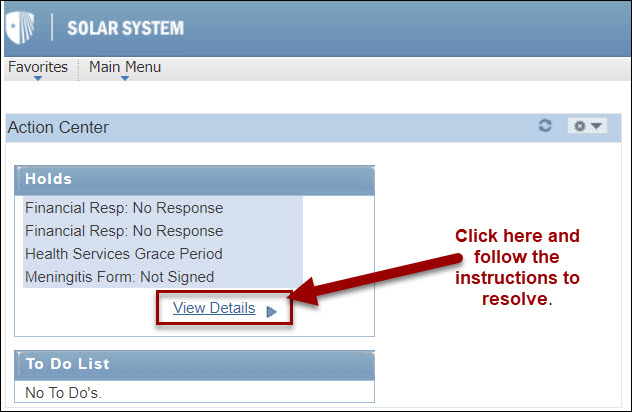
- A "hold" is an administrative requirement that a student must resolve. Students can review any holds they may have in the Action Center on the top left corner of the SOLAR home page. Students should check for holds at the start of every enrollment cycle.
- All new students will have at least one hold in SOLAR that will need to be addressed before they can enroll.
- Some examples of actions that students will need to clear holds include: providing proof of health insurance, signing the Financial Responsibility Statement, enrolling in SB Alert, or submitting immunization records (see next question for more information on immunization).
- Most holds can be cleared right within SOLAR. Simply click on the link to find out what you need to do.
- SPD has compiled a listing of holds for review.
- In accordance with New York State Public Health Law, Stony Brook University requires that all students born on or after January 1, 1957 provide proof of immunity against measles, mumps and rubella. The state also requires that all students receive information about meningococcal disease.
- Students who are enrolled in an SPD program that is fully online should check with Student Health Services for requirements.
- Students taking on-campus courses need to submit their immunizations ASAP but at least before Day 1 of the term.
- For more information, please contact Student Health Services at 631-632-6740.
- Make a list of courses you plan to take.
- If necessary, discuss your options with your assigned faculty advisor or graduate program coordinator.
- A list of courses offered can be found on the Graduate Courses page of the SPD website, or in SOLAR.
Please note the following course types:
-
-
- Face-to-Face: Course activity is organized around scheduled in-person class meetings.
- Synchronous: The course is delivered through web-based technologies, at least some of which is during scheduled course or exam times. A synchronous course may have some asynchronous components.
- Asynchronous: All course activities are conducted online with no requirements for scheduled sessions or in-person activities, including examinations. The only scheduled interactions are office hours with instructors.
- Hybrid: In-person class meetings are mixed with synchronous and/or asynchronous online activity.
- Other: The course has distinctive parameters that do not fit with any of the other definitions.
-
- All students register for classes on SOLAR.
- New students enroll during the open enrollment date listed on the academic calendar.
- Returning students can find their enrollment appointment date in SOLAR.
- See SBU's guide for how to enroll in a class. (As a grad student, you will not have course attributes to search for a class; just disregard this part.)
- If your desired course is full, follow the steps below to add yourself to the waitlist.
-
- Add the Course to Your Cart: Search for the course and add it to your enrollment cart.
- Enable the Waitlist Option: During enrollment, select the checkbox labeled “Waitlist if the class is full” and proceed with the enrollment steps.
- Check Your Waitlist Position: If waitlisting is available and the course is full, you will be placed on the waitlist. Your waitlist position will be displayed once the process is complete.
- Monitor Your Enrollment Status: As enrolled students drop the course, your waitlist position moves up. Once a seat becomes available and you are eligible, you will be automatically enrolled. Check your course schedule regularly to avoid enrolling in more courses than intended or permitted.
- Familiarize yourself with Academic Calendar, including the tuition liability dates in case you need to drop.
- Additional information on how to get started on SOLAR is available on the SOLAR FAQ page.
- Log in to Brightspace and review your syllabus, available two weeks prior to the start of the term. (Note: It takes 24-48 hours after registration for a course to appear in Brightspace).
- Resolve any account access issues by contact the University's DoIT team at 631-632-9800. For other issues or questions, submit a help ticket.
- Order your books.
- Find your class, if you are taking on campus classes.
- Review your library and citation skills.
- Contact your instructor via email if you have questions about your course.
- Visit the Student Financial Services website to learn more about the billing process.
- Visit the Financial Aid website to learn about FAFSA and funding resources.
- Please note that any correspondence or information relating to your Stony Brook student record will only be sent to your Stony Brook University email address.
- Instructions for accessing and setting up this email account can be found on Stony Brook's IT website.
Students wishing to park on University campuses or use our transportation services,
should visit the Mobility & Parking Services website for information on how to obtain a parking permit, parking maps and other important
information.
- All SPD students are eligible to receive a Stony Brook University ID card, whether they take their courses on-campus, online or in one of our cohorts. To obtain a photo ID card, you will need to go in person to the Campus Card office during its business hours (refer its website for details). Please bring a form of government-issued photo identification (e.g. a driver's license, passport, etc.).
- If you are a fully online student who needs an ID card but is unable to come to campus, you can receive a Distant Learner ID, which will not have a photo. To request a Distant Learner ID card, contact the Campus Card office.
Students who are currently charged at the non-resident rate, and wish to be considered
for resident tuition should review the eligibility requirements, and complete a residency
application if they feel they are eligible. The application form and instructions
are available here: New York State Residency for Tuition Billing Purposes