



SPIR Appointment and the Process
You are reading this page probably because Prof. Purwar has directed you to here. The rest of this page is written in the first-person narrative from him.
You are required to read this page completely before you can be put on a SPIR project. If you have any questions or doubts you can ask me when you meet me in my office.
Step 0: Determine your Eligibility
I can only hire full time and matriculated student of Stony Brook University, so if you don’t plan to be one, then let me know ASAP. There are no exceptions to this policy and you can’t fall through the cracks since when your appointment paperwork is sent to Human Resources they will check, and will deny appointment. If you are going to be graduating in a semester you are appointed, and you have only a certain number of credits to take to graduate (thus, it puts you in a part time status), then you have to get me a letter from the undergraduate program director or international office saying that you need only those many credits before graduating.
If you are appointed during a summer term, you need to be registered as a full time matriculated student for the coming Fall semester or simply be registered as a matriculated student during the summer break to be appointed on research. If you are appointed during a regular semester, you need to be registered as a full time, matriculated student in that semester.
Step 1: Download and Fill-in Forms
If you are working on a SPIR project, there would usually be two components of your appointment. You would be a Student State employee in the title of Student Assistant (most likely, in the beginning of the project) for a while and then you would be a Research Foundation employee. Sometimes, this order is reversed. This is because you get paid from two different sources. Do following to complete your appointment. Read carefully and follow it point by point. Bring these to me within 3 days of the receipt of my email asking you to do following. My email to you would also tell you if you would be an hourly employee or a biweekly paid employee. If you are an undergraduate student, you are always going to be an hourly employee. Graduate students can be hourly or biweekly employees. Choose accordingly from the following two options and download all the forms (right click on each of them and choose "Save Target As" and save it on your local hard drive!). All of these forms can be filled in electronically, except for the I-9 form, which needs to be filled in by hand only. Do not staple any forms, and only bring me those pages of the form in which you put in information. Thus, this excludes additional pages of instructions and worksheets.
In an order to get paid, you need to fill in your hours for the work that you perform at the company. When you are appointed as a state employee you fill hours on SOLAR system, while on research appointment, you fill in paper time sheets. Download a template paper time sheet here.
Select an option based on whether you are on a State or Research appointment.
When you are a state employee, I will appoint you on the SOLAR system. Once that is done, you need to do following to enter hours:
- You need to log on to the SOLAR system, click on the "Fill Time sheet" (or something like that) option at the bottom right corner.
- Click search on the next page.
- You would see your assignments. Click on the assignment and fill in your hours. Make sure that your supervisor agrees with the hours you are filling in. From time to time, I ask for a report on the hours you worked from the company and everything has to be in order. Click on the plus '+" sign to add more rows to add more hours on the same or another day.
- Send me an email when you fill in the hours asking me to approve the hours before the hours approval deadline -- check the state payroll deadline and the paycheck dates by logging on to SOLAR system and then clicking on the "SA/FWS Payroll Period".
NOTE: There are a limited number of hours (say, N) that you can fill on the SOLAR system. I will tell you the value of N. Once you have completed these N number of hours of worked and filled in at SOLAR, you'd go on Research appointment.
You downloaded the time sheets for Research appointment above. However, occasionally, I will email you an updated time sheet with more information filled in. Use the updated one when I send you one. When you are appointed on research, you will again receive your time sheet in mail from the research foundation. When you get that one, use it and discard all others. With any time sheet, you need to do following:
- Use the table given on the web page at http://www.stonybrook.edu/hr/payroll/rf/time.shtml to determine the payroll period you worked in.
- Write that payroll period on top right in the time sheet.
- Calculate the hours worked on each day in the chosen payroll period, and put in date, time in, time out, and the "Total" everywhere. There are no Overtime or premium hours for you. Make sure that you do not exceed 80 hours in this time sheet during summer and winter break and 40 hours during academic sessions, i.e., Fall and Spring semester. Click here for an example of how you should fill in the time sheets (notice that it is filled in on the computer!).
- Get your supervisor's signature on those time sheets and bring or mail (not e-mail) the original to me. The Research Foundation does not accept faxed/scanned/emailed time sheets. I will sign next to Project Director.
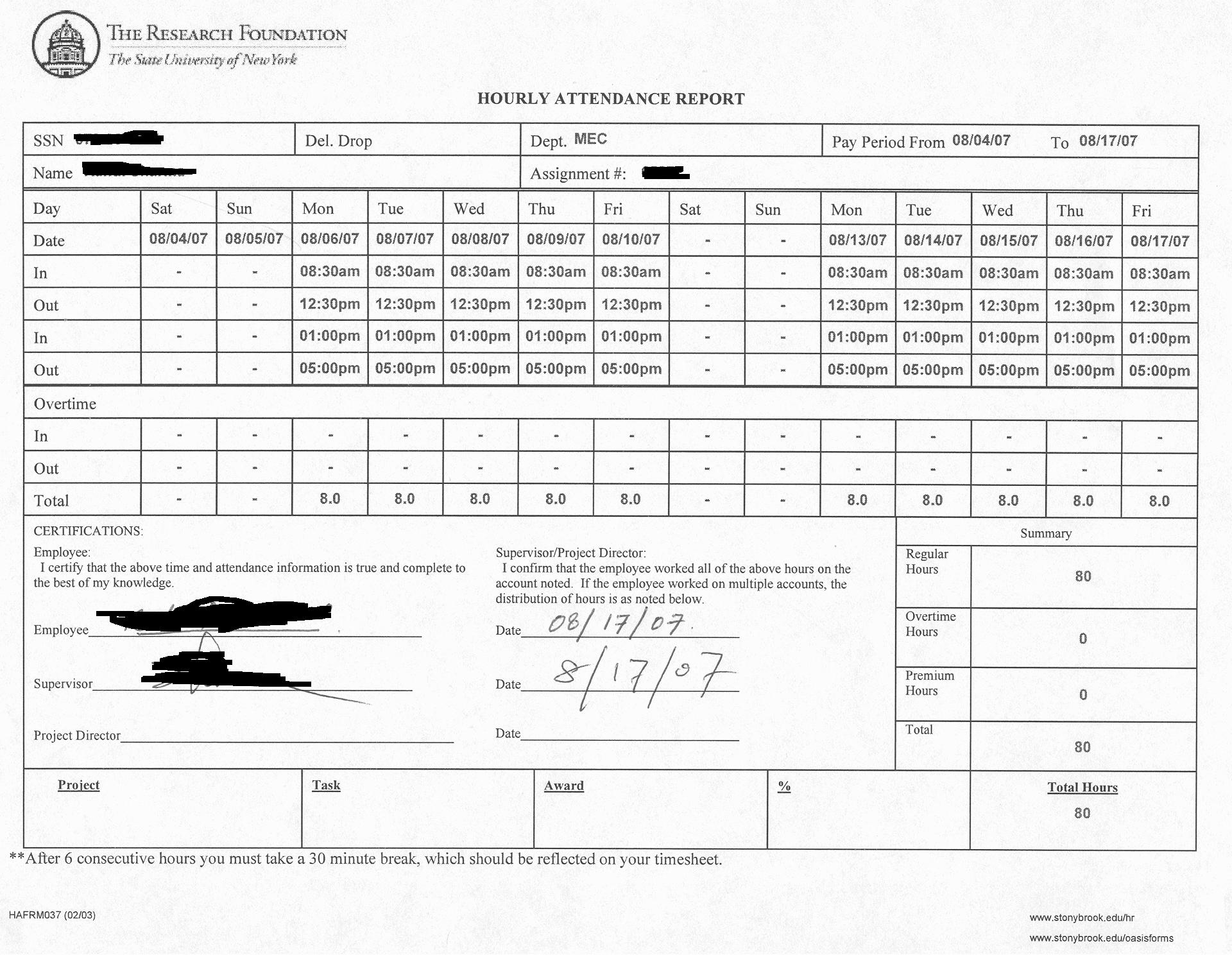
NOTE 1: There is a limit to how many hours you can fill in research time sheets too. That figure is say, X hours. My email to you contains the value of X.
NOTE 2: Make sure that you write legibly in the timesheets and you calculate the hours worked on each day and put it in the "Total" row. Also, the hours worked should be within the chosen payroll period. Remember that the state payroll period are different from Research Payroll period. Often, time sheets are returned to me by the Research Foundation on these accounts.
Step 3: Check your forms against this checklist
Checklist (before you come to see me):
- Did you fill it by hand?
- Did you sign, but not date it?
- Did you attach required documents (such as passport, etc.)?
- Did you make sure that you have the originals of the attached required documents to show me?
- Did you not attach instructions and worksheets?
- Did you not staple it?
- Did you fill in People Data (including Special info) and Address section data in it, and only those sections?
- Did you put in your name on top of page 2?
- Did you sign it?
- Did you not staple it?
- Did you fill it and sign it?
- Did you not attach worksheet and instructions?
- Did you not staple it?
- Did you fill it and sign it?
- Did you not attach worksheet and instructions?
- Did you not staple it?
- Did you complete the form?
- Did you collect required documents (such as passport, etc.) as mentioned on that form?
- Did you make sure that you have the originals of the attached required documents to show to Human resources?
Did you complete this form with your signature?
Did you email it to me?
Step 4: Read the FAQs
First, see the pay period deadlines here: http://www.stonybrook.edu/hr/payroll/rf/time.shtml
Then, make sure that you gave me the time sheets before the Submission Deadline --
and well before it. The deadlines posted on that link are the Research Foundation
deadlines, not my deadlines. Which means that if you give me your time sheets on the
last day of the deadline, you are already late since your time sheets would not reach
the Research Foundation until next day. You would get paid now in the next pay period.
If you want to be paid timely, you should give me your time sheets right after (no
later than two days) a pay period ends, not 5 days after it.
If you give me your time sheets well before the deadline, then chances are that your time sheet would be received by the Research Foundation in time. In that case, you would get paid on the Pay Day as indicated on that web page. Again, first contact one of the dept secretaries, and then me if you still did not get a check. Sometimes, you may not get paid on time simply because your time sheets are lost in the mail, or the project is being renewed.
First, see the SA/FWS pay period deadlines by logging in to SOLAR, and then click
on "SA/FWS Payroll Period".
Then make sure that you asked me to approve the hours before the Submission Deadline
-- and well before it. The deadlines posted in that spreadsheet are the State payroll
deadlines, not my deadlines. If you want to be paid timely, you should ask me to approve
your entered hours right after (no later than a day) a pay period ends. The difference
between the end of a state pay period and the approval deadline is just two days!!
If you gave me enough time to approve your time sheets well before the deadline, then chances are that you would get paid on the Pay Day as indicated in the spreadsheet. Sometimes, you may not get paid on time when the project is being renewed or is in transition.
For Research Foundation employee direct deposit: http://www.stonybrook.edu/hr/misc/dd/rf.shtml
For State employee direct deposit: http://www.stonybrook.edu/hr/misc/dd/state.shtml
Apart from the personal satisfaction that you derive from doing a good job to the best of your abilities, the rewards are numerous:
- It may lead to continued employment at the company and eventually you may land a permanent job there or elsewhere
- You gain real world industrial experience and a potential employer would know that you have been there and done that
- Based on your performance on the SPIR project, I recommend some of you for a SPIR award at the time of graduation. The award recognizes your work and sets you apart from your peers; no doubt, it looks good on your resume as well.