


How to Order Course Materials
Step 1
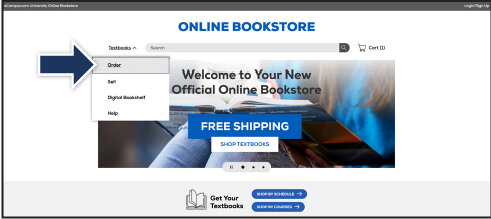
Visit your Online Bookstore and select Order from the drop-down menu.
Step 2
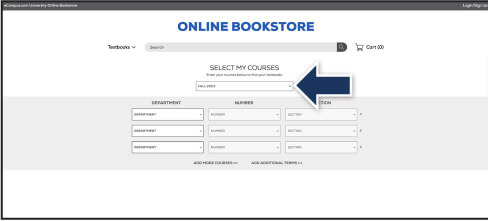
Select your term from the drop-down menu.
Step 3
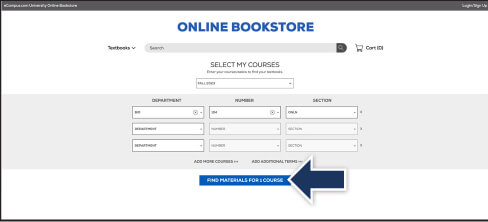
Select your course(s) and select Find Materials for Course.
Step 4
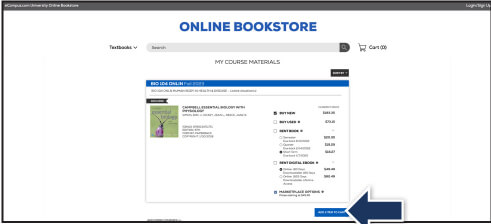
Select the item(s) to be purchased and select Add Item to Cart.
Step 5
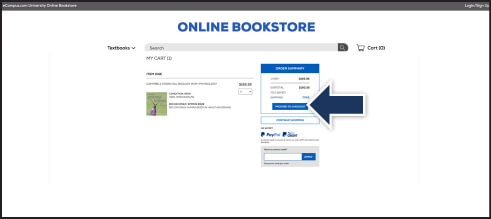
Review your order and select Proceed to Checkout.
Step 6
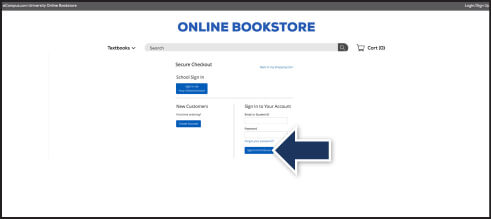
Sign in to your account or select Create Account to compete the checkout process.
If a rental is being ordered, a credit card is required at checkout regardless of the selected payment method.
The credit card will not be charged unless the rental is not returned or is damaged.